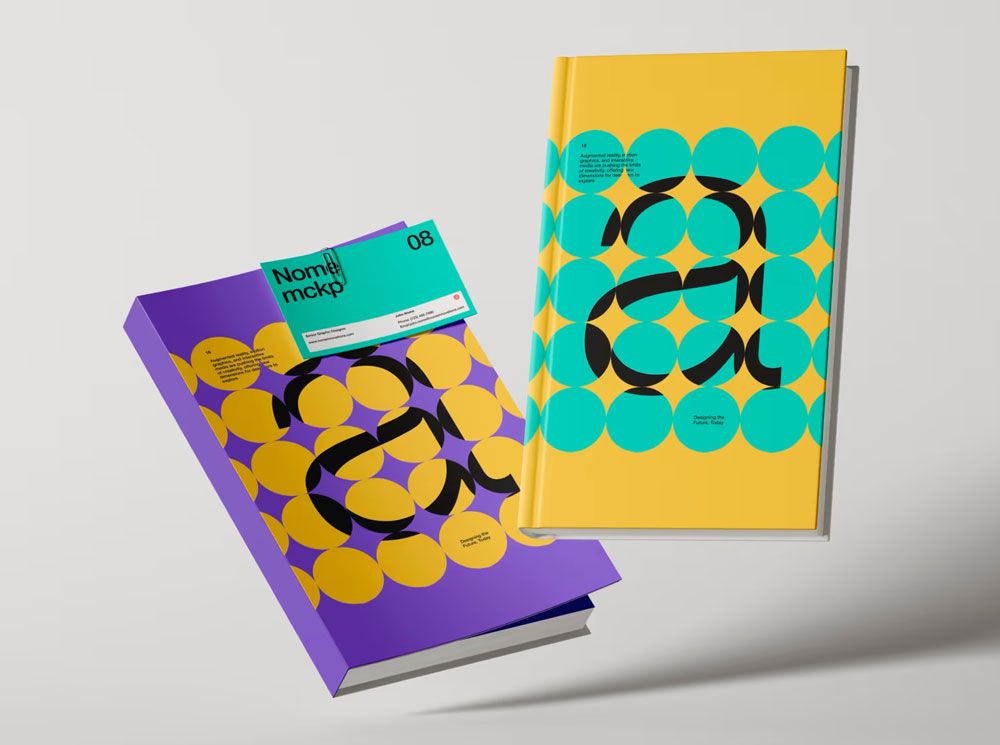
Stunning Book Cover Mockup

Home > free > Stunning Book Cover Mockup

Stunning Book Cover Mockup

Free Stunning Book Cover Mockup

A stunning Book Mockup shown at an angle to highlight your book’s front cover design. This template is perfect for visualizing how your layout will look when printed. It’s available for download in high resolution, ensuring top-notch quality, even for printing. You can easily add your cover design using smart layers, and you can customize colors, lighting, and backgrounds too.


Applications:
Photoshop
File Types:
PSD
File Size:
48 MB
Dimension:
300 DPI
License:
Free For Use
Author:
ls.graphics

MORE MOCKUPS YOU MAY LIKE

You pick out some of free mockup

Book Box Mockup

The best Book Cover Mockup comes with a dust jacket to showcase any type of print designs. It has advanced smart objects layers. The outcome always is an outstanding presentation which attracts the clients and customers.

Book Page Mockup

The best Book Mockup offers a variety of objects like an open book, iPad, business card, fruits, plate, glass bowl, thumb pins, paper cutter and a pen. All items are placed in separate folders to adjust the shadows and effects of each item individually. You can move and remove any of the items to make […]

Mirror Paperback Book Mockup

Present your book design with elegance and sophistication using this high-quality paperback Book Mockup. This mockup highlights the book’s cover design, spine details, and overall proportions in a stylish, minimalist environment. Perfect for authors, publishers, and graphic designers, this PSD file includes smart object layers for easy and quick customization.

Belly Band Hardcover Book Mockup

This Hardcover Book Mockup PSD is a professional tool to showcase your creative work with style and clarity. This mockup is perfect for publishing projects, branding concepts, or promotional materials. Moreover, the stylish belly band highlights author names, special titles, or marketing messages, ensuring your design stands out. With five high-quality PSD files, you can […]

Open Book Mockup

The best Book Mockup to bring your artwork to the scene, sharing covers and branding presentations with a new perspective. You can change the background’s color and texture, adjust the shadows, and scale the book according to your taste.

Open Square Catalog Mockup

The best Catalog Mockup with paper clips floating in the air. Insert book design on both opened pages by using smart object. You can also change the color of background color by applying fill on the last layer.

Horizontal Photo Book Mockup

Display your photography album or portfolio using this horizontal photo Book Mockup. It boasts a high-resolution, photorealistic hardcover design with detailed pages, making it ideal for professional photographers, publishers, and print designers.

Landscape Book Mockup

Free Landscape Book Mockup PSD to showing a landscape-oriented book. Just add your own custom design inside the smart object and you are done.

Open Diary Mockup

The best Diary Mockup to magnificently present your own creations. You can use this mockup to showcase your drawings, sketches or any other text. You can also change the intensity of shadows and lights.

Standing Book Mockup PSD

The best Book Mockup to showcase your next book cover design project. Adding your cover design just like a breeze. Use this mockup to display story book, novel, textbook, dictionary, thesaurus, guite book etc. All you have to do is just double-click the smart layers, add your design and hit save.

Standing Hardcover Book Mockup

The best Hardcover Book Mockup that you can to create something unique and that stands out. This free mockup comes with smart object layers that allow you to make the changes needed to create your design using the template.

Back Square Catalog Mockup

The best Catalog Mockup for editorial designs for graphic designers, print houses, promotions, advertising, etc. Place artwork on smart object and get a photorealistic outcome. So you can choose the color combination that compliments the book back cover design.

Top View Hardcover Book Mockup PSD

The best Book Mockup that can be a perfect choice for thick novels, story books, magazines, textbooks etc. This free mockup is fully customizable from either using the spectacles placed next the book. Change the cover of the book by using smart object. Background is also changeable.

Dust Jack Hardcover Book Mockup

The best Hardcover Book Mockup for you to try out your designs and come up with a final one that best suits your needs. Make the necessary changes to the PSD template file using Adobe Photoshop. The template works by editing Smart Object layers.

Hardcover Book Mockup PSD Set

The best Book Mockup is prepared so that you can quickly and easily change the color of each element of the book or paste your own design. Place artwork on smart objects and get a realistic outcome. You can apply fill on the background as per your requirement.

Hardcover Book Mockup

The best Hardcover Book Mockup to display your designs with a gorgeous book placed on a wrapping paper. Just add your own custom design inside the smart object and you are done.

Square Hardcover Book Mockup PSD

Have you ever pondered the reason behind the existence of both paperback and hardcover books? Many renowned publishers and authors opt for printing their novels on inexpensive paper. By choosing paperback, they are able to reduce the cost of each book, as it is easier to transport and cheaper to produce. On the other hand, […]

Book Cover Mock-up

The best Book Cover Mockup to present your paperback designs in a realistic way. Use the smart objects of this PSD file to easily insert your designs and change the color of the book and its spine.

Soft Cover Book Mockup

The best Book Mockup to showcase book cover designs for presentation. You can achieve the desire branding via smart-object layers. You can also change the background color.

Elite Book Mockup

Free Elite Book Mockup PSD will help to give the final and professional look to your designs before going to printing. Just add your own custom design inside the smart object and you are done.

ADDED TO CART