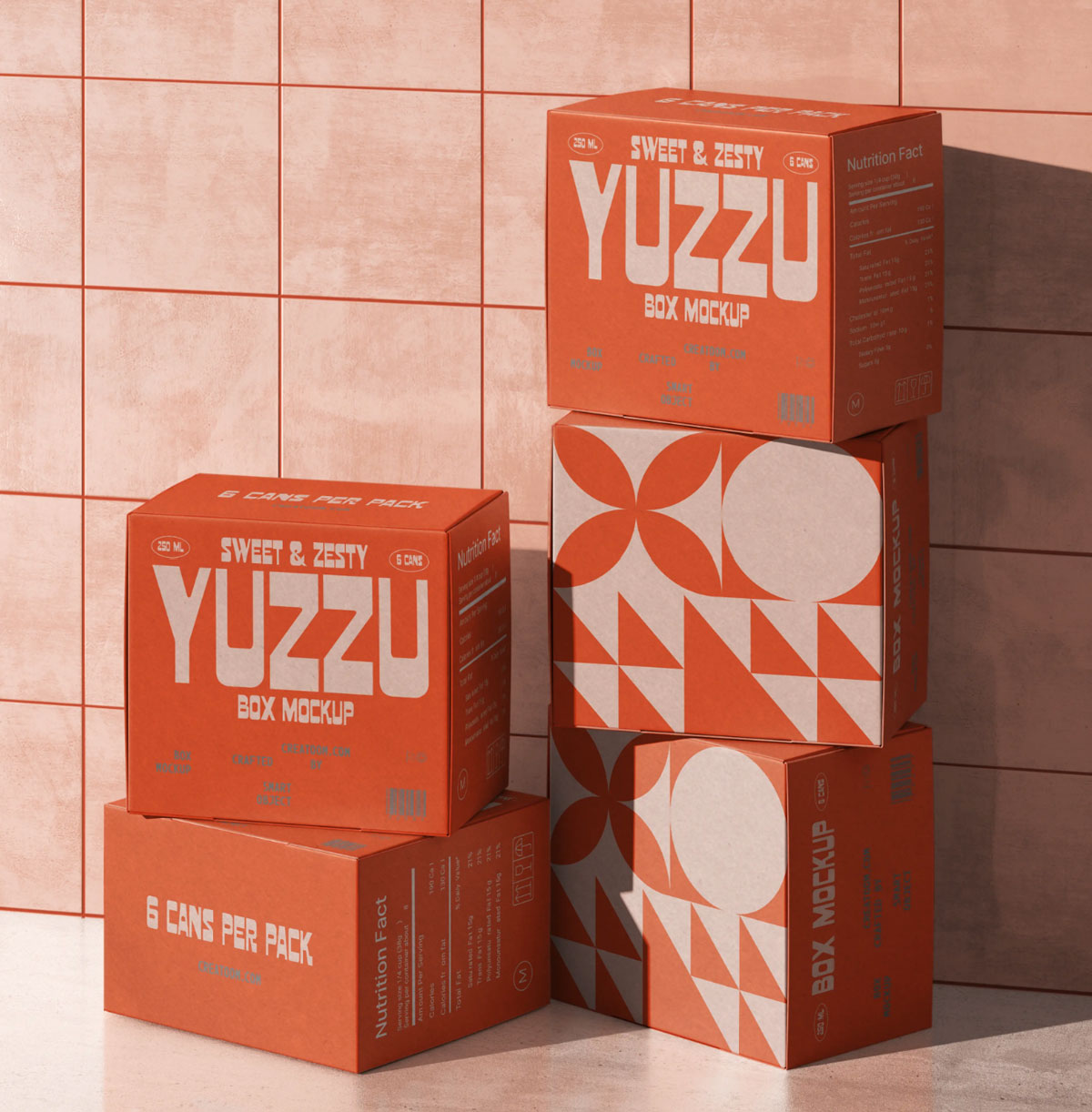
Stacked Packaging Box Mockup

Home > free > Stacked Packaging Box Mockup

Stacked Packaging Box Mockup

Free Stacked Packaging Box Mockup

Display your packaging designs with this Stacked Box Mockup, created to showcase product branding in a realistic and professional presentation. The PSD features realistic textures and multiple viewing angles, allowing you to present every detail of your design with clarity. Fully editable smart object layers let you insert your artwork quickly and customize the boxes with ease. This mockup is ideal for product packaging, retail branding, shipping boxes, subscription boxes, corporate presentations, e-commerce listings, client approvals, and portfolio showcases.


Applications:
Photoshop
File Types:
PSD
File Size:
131 MB
Dimension:
300 DPI
License:
Free For Use
Author:
Creatoom.com

MORE MOCKUPS YOU MAY LIKE

You pick out some of free mockup

Craft Box Packaging Mockup

The best Craft Box Packaging Mockup a useful resource for any kind of packaging project you’re working on. It’s easily editable so you can insert your images and texts via Adobe Photoshop with only a couple of clicks and hit the save button.

Perspective Square Box Mockup

Present your packaging designs with elegance and simplicity using this Square Box Mockup PSD. Meticulously prepared in high resolution with attention to every detail, this mockup offers a clean perspective view that showcases your branding, logos, and patterns with professional polish. This square box mockup now and give your next project the elegant, professional presentation […]

Slide Square Box Mockup

The best Box Mockup features a beautiful gift box that has a ribbon on the top of the lid for easy opening. This free square sleeve box allows you to showcase your design from three different angles. Download and just drag and drop your design inside smart object layers.

Shoe Box Mockups

The best Shoe Box Mockup that can be used to showcase shoe box design, storage box or a gift box design. There are 5 psd scenes generated and all of them have 5 smart objects to display design on all panels of the box.

Paper Box Mockup

Free Paper Box Mockup PSD to showcase your design work with only a few clicks. Just add your own custom design inside the smart object and you are done.

Product Box Package Mockup

The best Product Box Mockup will allow you to present your design in a professional stylish way. You can add your own graphics and edit it via smart layers, so you can change the background or add some products next to the box.

Software Box Mockups

The best Box Mockup that contains 2 standing-up boxes is ideal for a collection of softwares that hold the same design pattern but differ in colors and texts. Place your artwork on bottom/top, front and left panels by using smart objects.

Folding Box Mockup

These boxes are an excellent option for packaging gifts, as they offer ample space to accommodate cosmetics, electronics, gadgets, small decorations, frames, books, and even stationery items. Perfume shops, wristwatch shops, and toy stores often opt for these magnetic boxes to present their premium offerings, as they make for perfect gift options. In this mockup […]

Cardboard Drawer Box Mockup

The best Cardboard Box Mockup that you can create your own brand on your boxes. This mockup features a simple but effective drawer box. PSD file is high resolution and layers are well organized, well managed and named properly.

Paper Gift Box Mockup

The best Paper Gift Box Mockup that via smart-object layer you can get the desire presentation. Result after placing artwork will be super realistic as shadows and highlights are prepared in a very subtle manner.

Medicine Box Mockup

The best Box Mockup to present your package designs. It uses smart object layers that enable you to instantly drag and drop your graphics.

Packaging Tape Box Mockup

The best Box Mockup for your next packaging/branding design project. You can place your logos, artworks, badges, text, and other branding artefacts on both the tape as well as the box using smart object layers in Photoshop.

Square String Gift Box Mockup

The best Box Mockup are unique and there is no need for wrapping with gift papers. You can customize the colors of every part according to your requirement. In this mockup, you will be able to change the artwork on the box and background color.

Vertical Box Mockup

The best Box Mockup in an isometric view which gives your packaging design more visibility in your presentation. The free mockup is fully customizable and almost all the elements are editable including package design, colors, backgrounds, lights and shadows. It is very easy to edit all the boxes with just three smart object layers.

Isometric Square Box Mockup

It showcases several isometric boxes in different distinct colors against a white backdrop. Moreover, you can easily change the box colors and add your logo with just a few clicks. You’ll be able to create an impressive box design presentation that will truly impress everyone.

Pizza Boxes Mockup

Free Pizza Boxes Mockup PSD to insert in your own design and give it a quick go. Just add your own custom design inside the smart object and you are done.

Packaging Product Boxes Mockup

The best Box Mockup for sharing a horizontal product presentation in PSD format. Place your artwork on smart objects and change the background color of your choice.

Realistic Pizza Box Mockup

The best Pizza Box Mockup with a delicious pizza placed inside the box. All the sides of the pizza box offer separate smart objects for the replacement of designs. You can use well-organized layers to customize the shadows, background and light effects.

Shipping Box Mockup PSD

Check out this super realistic and flexible shipping box mockup, ideal for displaying your packaging designs. It comes with various angles, including an open version to show off your interior branding. This mockup lets you present your designs in a stylish and creative way. The sleek textures and lifelike details make sure your artwork stands […]

Mail Cardboard Box Mockup

The best Box Mockup to place artwork on all sides of the box and get a realistic outcome. Using the smart layer you can make it your own. You can change the background color as per your choice.

ADDED TO CART