Book Cover Mockups PSD

Home > free > Book Cover Mockups PSD

Book Cover Mockups PSD

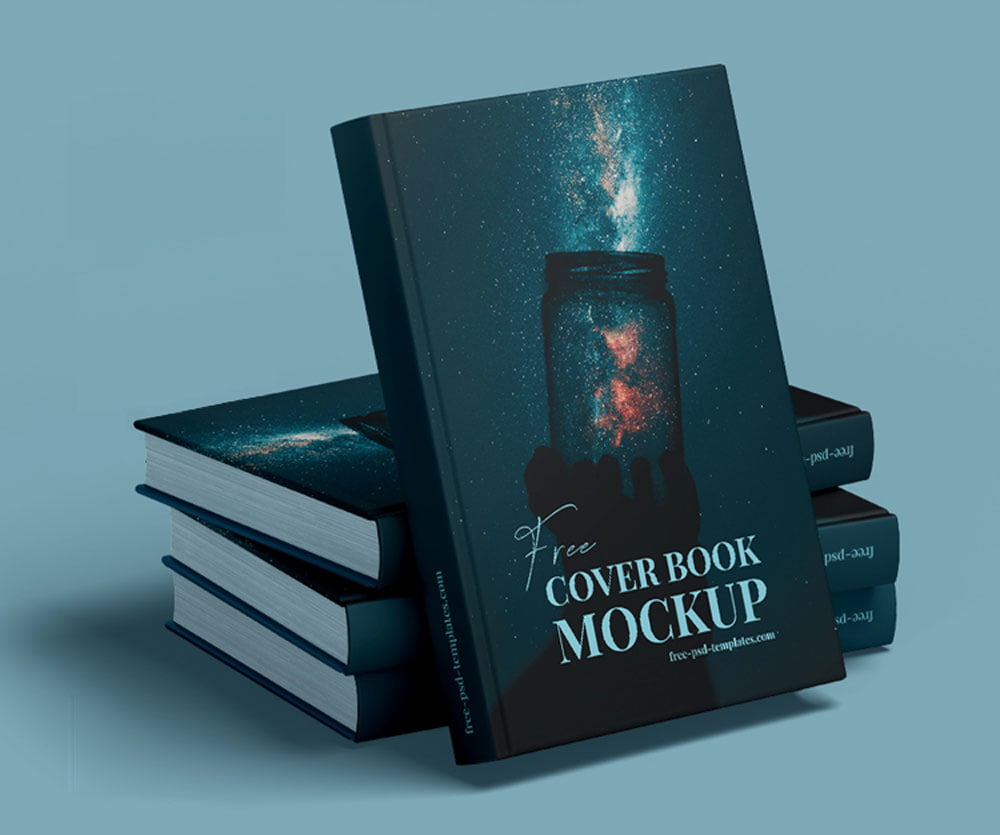
Free Book Cover Mockup

The best Book Cover Mockup to add all the design elements you want to see on your book to the mockup. Insert title design, spine design, backside by using smart objects and change the color of background that compliments the presentation.

Free Book Cover Mockup


Applications:
Photoshop
File Types:
PSD
File Size:
377 MB
Dimension:
5000x4000 px
License:
Free For Use
Author:
Free-psd-templates.com

MORE MOCKUPS YOU MAY LIKE

You pick out some of free mockup

Customizable Hardcover Mockup

The best Hardcover Mockup to change the designs of the book cover, bookbinding, sleeve and the tag. You can also adjust the effects, shadows and the background just by using well-named layers.

Mirror Paperback Book Mockup

Present your book design with elegance and sophistication using this high-quality paperback Book Mockup. This mockup highlights the book’s cover design, spine details, and overall proportions in a stylish, minimalist environment. Perfect for authors, publishers, and graphic designers, this PSD file includes smart object layers for easy and quick customization.

Hardcover Book Mockup PSD Set

The best Book Mockup is prepared so that you can quickly and easily change the color of each element of the book or paste your own design. Place artwork on smart objects and get a realistic outcome. You can apply fill on the background as per your requirement.

Hardcover Book Mockups PSD

The best Book Mockup to showcase your book titles inside one design template. This free mockup comes in PSD format and is very easy to insert your design inside smart object layers. Background color can be applied if required.

Square Paperback Book Mockup PSD

The best Book Mockup for title design, spine design, back page design, inner pages and multiple books grid mockup. All mockup PSD files are smart object ready and layers are organized. Background is also customizable.

Standing Book Mockup

The best Book Mockup that displays a standing hardcover book from a perspective point of view. You can easily edit the background, insert your graphics, and add your end results to both personal and commercial projects.

Hard Covers Book Mockup

The best Book Mockup is a great tool to present your book cover design projects as well as ideas in a beautiful way. You can easily insert your designs into the designated layers using the smart object layer feature in Photoshop.

Open Paperback Book Cover Mockup

A polished mockup for a magazine or softcover book, crafted specifically for editorial projects. It comes as a single PSD file featuring customizable background colors, isolated shadows, and well-organized layers. This Book Mockup is perfect for showcasing intricate designs for publishing portfolios, stationery, pitch decks, e-commerce displays, product launches, book club promotions, educational resources, content […]

Belly Band Hardcover Book Mockup

This Hardcover Book Mockup PSD is a professional tool to showcase your creative work with style and clarity. This mockup is perfect for publishing projects, branding concepts, or promotional materials. Moreover, the stylish belly band highlights author names, special titles, or marketing messages, ensuring your design stands out. With five high-quality PSD files, you can […]

Hard Cover Book Mockup PSD

The best Book Mockup allows you to present your designs for the full front cover as well as the spine for novels, catalogs, self-help books, artwork collections, etc. You can easily edit the background, insert your graphics.

Hardcover Catalog Book Mockup

The best Hardcover Book Mockup to showcase any of your designs in a striking way. It also comes with the smart object feature that allows you to easily insert your graphics. And once you change the color of the book, the background, and the surface, you will have an exciting mockup to include in personal […]

Softcover Book Mockup

The best Softcover Book Mockup will allow you to showcase your book design in a professional way. The mockup is available in PSD format, it’s super easy to use; simply add your design via smart layers and you’re good to go.

Slipcase Book Mockup

The best Slipcase Book Mockup gives you an idea of how the final design of the cover of your book might look like once it gets printed. All you need do is place your artwork inside the smart layers, hit save and you are done.

Hardcover Book Catalog Mockup

The best Hardcover Book Mockup to display your ideas for hardcover books and new releases, catalogs, photographs and artwork collections, branding designs, and many more. you’ll get You can easily customize the scene thanks to the smart object layers.

Hard Shadow Square Book Mockup

With a Book Mockup, you can display graphics, illustrations, fonts, logos, and various other graphic elements. This mockup comes in seven high-resolution PSD files, allowing you to fill your presentation with stunning graphics and leave a lasting impression on your audience.

Square Notes Hardcover Book Mockup

The best Book Mockup to showcase any of your graphics. Place artwork on smart object and fill color on the background that compliments the design.

Book Cover Mockup

The best Book Cover Mockup to presentation of book cover designs by using this mockup. Customizing the mockup is really easy as it has smart object layers.

Standing Hardcover Book Mockup

The best Hardcover Book Mockup that you can to create something unique and that stands out. This free mockup comes with smart object layers that allow you to make the changes needed to create your design using the template.

Woman Holding Book Mockup

This Book Mockup captures a natural, realistic scene of a woman holding a book, making it ideal for showcasing cover designs, branding projects, or promotional materials with elegance and authenticity. The high-resolution PSD file includes Smart Object layers for quick and easy customization, allowing you to insert your artwork effortlessly and achieve a polished, professional […]

Dust Jacket Hardcover Book Mockup

The best Book Mockup are all the same information a book title design, spine, and backside of the book. The book, shadows and background are placed on separate layers so you can easily display just one book or make other adjustments.

ADDED TO CART